
ServiceM8 Purchase Order Add-on
ServiceM8 Purchase Orders, Linked to Every Job
Create purchase orders straight from ServiceM8 job materials, send them to suppliers, receive stock into your warehouse or vans, and have the bill land in Xero — all without retyping a single line.
- Available in the ServiceM8 Add-on Store
- Bills sync to Xero
- Includes inventory & van stock
Does ServiceM8 have purchase orders?
Not on its own. ServiceM8 does not have built-in functionality to create and send purchase orders to suppliers — it relies on add-ons from the ServiceM8 Add-on Store.
StockUnify is a ServiceM8 add-on that does more than generate a PO. Every purchase order is linked to the job, received into stock, billed in Xero, and the materials are tracked right through to job completion.
| ServiceM8 on its own | ServiceM8 + StockUnify | |
|---|---|---|
| Purchase orders | No built-in purchase orders | Create POs from job materials in a few clicks |
| Multiple Stock Locations | No support for multiple stock locations | Support for multiple stock locations(E.g.: Warehouse, Vans) |
| Stock level updates | Updated only after invoices sync to accounting | Updated on PO receipt and deducted when the job is completed |
| Xero bills | No purchase order to turn into a bill | Created Bill in Xero automatically when stock is received |
How to create a purchase order from a ServiceM8 job
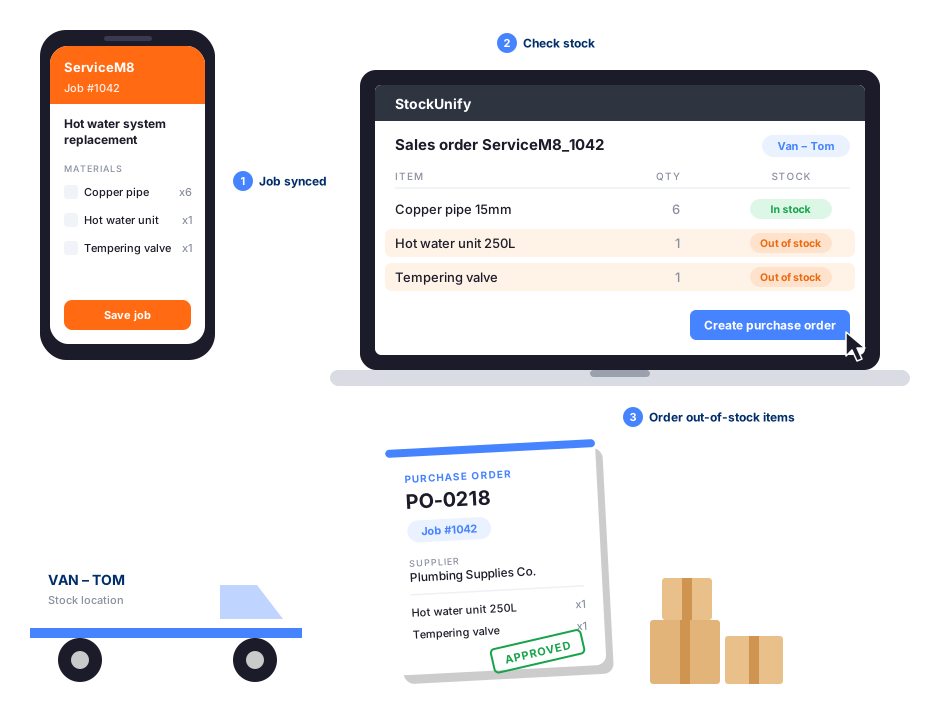
Once ServiceM8 is connected to StockUnify, raising a purchase order for a job takes just a few clicks.
- 1
Add materials to the job in ServiceM8
Your team creates the job and adds the materials needed, just as they do today.
- 2
See what you're short of
The job syncs to StockUnify as a sales order that shows stock availability for every material at the technician's van or warehouse. Add low stock items to the reorder cart.
- 3
Create the purchase order
Click to create a purchase order from the sales order or from the reorder cart.
- 4
Approve and send to your supplier
Approve the PO and generate a branded PDF from your own purchase order template, ready to send to your supplier.
- 5
Receive stock and bill in Xero
Click Receive Stock when the delivery arrives. Stock levels update, and a bill is created in Xero automatically.
- 6
Complete the job
When the job is completed in ServiceM8, the materials are deducted from stock and a packing note(PDF) is attached to the job card.
Why raise ServiceM8 purchase orders in StockUnify
StockUnify makes it easy to raise purchase orders for ServiceM8 jobs.
Order before you run out
Set reorder points for your materials and get a low stock alert before they run out. Raise purchase orders by supplier from the reorder cart to restock your warehouse and vans.
Branded PO templates
Send suppliers professional purchase orders generated from your branded template, with supplier details, delivery address, item codes and totals.
Bills synced to Xero
Every received purchase order creates a bill in Xero with your mapped accounts — no retyping supplier invoices.
Every PO linked to a job
Purchase orders raised from a ServiceM8 job (sales order) carry the job number, so you always know which job the materials were bought for.
Accurate inventory costs
Add freight, customs and other landed costs to a PO. StockUnify includes them in your product costs, so stock values and job margins are accurate.
Partial receiving
Receive what arrived and StockUnify splits the rest into a new PO, so back-ordered materials are never forgotten.
More than a purchase order add-on
Purchase-order-only add-ons stop at the PO. StockUnify gives ServiceM8 users full inventory management, so you know what is in every van and warehouse before you order.
Van stock tracking
Map each technician to their van and see exactly what they carry.
Automatic stock deduction
Materials are deducted from the van when the job is completed.
Product & stock sync
Send products, prices and stock levels from StockUnify to ServiceM8.
Kits and bundles
Use product packages on jobs and deduct stock for every component.
Purchase orders for every trade using ServiceM8
Whatever your trade, order the right materials for every job and keep your vans stocked.

ServiceM8 purchase orders in Xero
Run jobs in ServiceM8, buy and track materials in StockUnify, and keep Xero as your accounting system. Received purchase orders become bills in Xero automatically, coded to the accounts you choose.
ServiceM8 purchase order FAQs
No. ServiceM8 does not have built-in functionality to create and send purchase orders to suppliers, and recommends using an add-on. StockUnify is a ServiceM8 add-on that lets you create purchase orders from job materials, linked to the ServiceM8 job number, and also manages your inventory.
Start raising ServiceM8 purchase orders today
Try StockUnify free for 14 days. No credit card required — connect ServiceM8 and create your first job-linked purchase order in minutes.