
Xero Inventory Management App
Xero Inventory Management Software
Outgrown Xero's tracked inventory? StockUnify adds multi-location stock, purchasing, sales orders and batch & serial tracking — and keeps Xero up to date with invoices, bills and stock values automatically.
- Available on the Xero App Store
- Sign up with Xero
- Supports Xero tracked inventory
Does Xero have inventory management?
Xero includes basic tracked inventory, which works well when you hold a small range of stock in one place. As you grow — more products, more locations, more suppliers — you need more than a quantity and an average cost.
StockUnify is the inventory app built for Xero. Xero stays your accounting system, and you can still track total stock on hand and average cost in Xero. StockUnify adds stock traceability, multiple locations, bin locations, and batch and serial tracking.
| Xero tracked inventory | Xero + StockUnify | |
|---|---|---|
| Warehouses & bin locations | One stock pool per item | Multiple warehouses, stores and bin locations |
| Batch & serial tracking | No batch or serial numbers | Batch, serial and expiry date tracking |
| Assemblies & bundles | No assemblies or bundles | Build finished goods from components, or sell sets of products as a bundle |
| Low stock alerts | No low stock alerts | Get alerts when stock levels are low |
| Sales margin | Sales profit can only be analysed after the sale is invoiced | See the margin on every sales order before you sell |
The inventory features Xero users need
Everything you need to control stock, built to work hand in hand with your Xero accounts.
Multi-location inventory
Track stock across warehouses, stores and bin locations, and transfer stock between them in real time.
Batch & serial tracking
Record batch numbers, serial numbers and expiry dates for full stock traceability, and show them on customer invoices and packing slips.
Low stock alerts
Set reorder points for products and get alerts when stock levels are low.
Assemblies & bundles
Build finished products from components and sell kits, with stock deducted for every component.
Automatically replenish stock
Set a maximum stock level for each item, and StockUnify replenishes stock before it runs out.
Know your sales margin as you sell
See the margin for each product on every sales order, before the sale is complete.
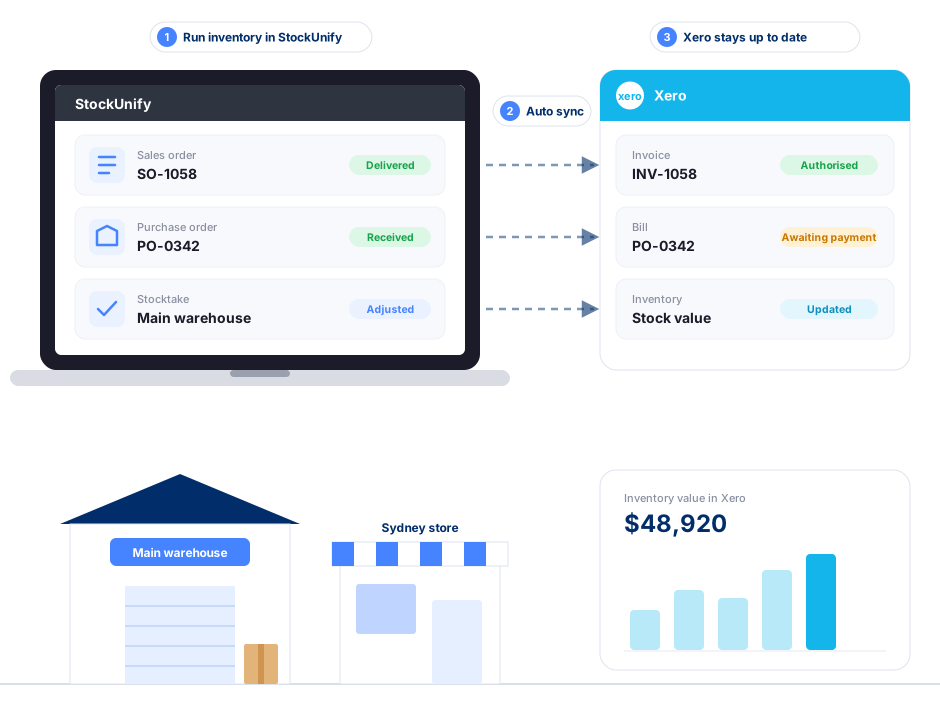
How StockUnify syncs with Xero
Once you connect your Xero account, products, sales orders, purchase orders and stock adjustments sync automatically.

- Sales orders create Xero invoices automatically
- Received purchase orders create Xero bills
- Stock adjustments update Xero inventory for tracked items
- Products sync to Xero with name, code, price and cost
- Xero tracking categories are applied to every invoice and bill
Xero inventory software for every business
Whatever you sell, StockUnify manages the stock and Xero keeps the books — always in sync.
Connect StockUnify to Xero today
- Install StockUnify from the Xero App Store.
- Sign in to Xero and authorise StockUnify.
- Map your Xero accounts and import your products, customers and suppliers into StockUnify.
Xero inventory FAQs
Xero includes basic tracked inventory: you can record quantities and costs for items you buy and sell. It is designed for simple stock needs and tracks each item as a single pool of stock. For multiple warehouses, bin locations, batch and serial numbers, assemblies and full purchasing workflows, most businesses connect a dedicated inventory app like StockUnify to Xero.
Upgrade your Xero inventory today
Try StockUnify free for 14 days. Sign up with Xero — no credit card required.