Shopify & Xero Inventory Integration
Shopify Xero Inventory Sync for Growing Brands
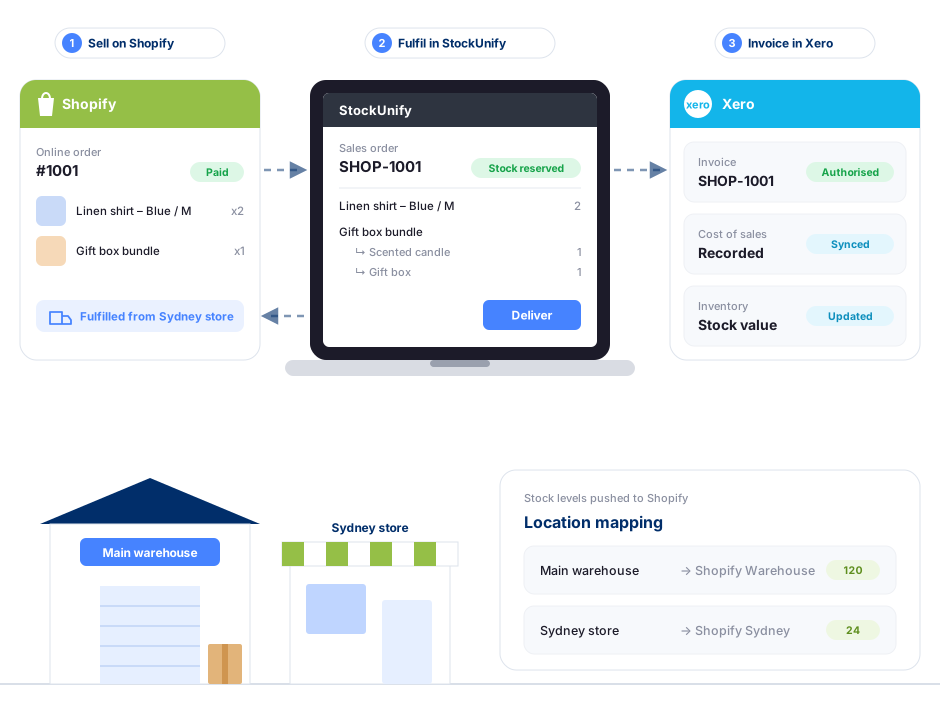
StockUnify sits between Shopify and Xero as the single source of truth for your stock. Shopify orders flow in, stock levels and fulfilments flow back to Shopify, and every sale lands in Xero as an invoice.
- Real-time stock sync
- Multi-location
- Invoices sync to Xero
Why Shopify merchants add an inventory management system
Shopify is built to sell online. But once you also sell wholesale, run a warehouse, buy from multiple suppliers or need your stock values in Xero, inventory gets harder to manage from your store admin alone.
StockUnify sits behind your Shopify store as the single source of truth for stock — so you never oversell online, and your purchasing, wholesale orders and accounting all use the same numbers.
Everything you need to run Shopify and Xero inventory
Sell on Shopify, run your stock in StockUnify and keep the books in Xero — with no manual data entry in between.
Real-time Shopify stock sync
Receiving stock, stocktakes and adjustments in StockUnify update your Shopify quantities automatically.
Multi-location inventory
Map Shopify locations to your warehouses and stores, and track stock and transfers between them.
Order import & fulfilment
Shopify orders become sales orders that can reserve stock straight away. Deliver in full or in part and fulfilments are created in Shopify.
Shopify bundles
Sell kits and bundles as one Shopify product, while StockUnify tracks and deducts stock for every component.
Purchasing & reordering
Create purchase orders, receive stock and get low stock alerts before your best sellers run out.
Automatic Xero invoices
Every Shopify order creates an invoice in Xero with your mapped sales accounts, and stock values for tracked items stay accurate.
How Shopify, StockUnify and Xero sync
Connect Shopify and Xero once. StockUnify then keeps orders, stock levels, fulfilments and invoices moving between them automatically — see how accounts are mapped in the Xero integration.


| Data | Direction | When |
|---|---|---|
| Orders | Shopify → StockUnify | Automatically for Paid (or Paid and Pending) orders |
| Stock levels | StockUnify → Shopify | Automatically whenever stock changes |
| Fulfilments | StockUnify → Shopify | When an order is delivered or partially delivered |
| Products | Shopify ⇄ StockUnify | Imported on demand by SKU; new products pushed to Shopify as Draft |
| Invoices | StockUnify → Xero | Automatically for every sales order |
Built for multichannel sellers
- Retailers selling in-store and on Shopify from shared stock.
- Wholesalers running a Shopify store alongside B2B orders and tiered pricing.
- eCommerce brands shipping from multiple warehouses.
Connect Shopify in minutes
- In StockUnify, open Integration and click Connect on the Shopify card.
- Enter your store name, log in to Shopify and click Install.
- Choose which orders to import, map your locations, turn on stock sync and import your products.
Shopify inventory FAQs
StockUnify is the source of truth for stock. When you receive stock, complete a stocktake or make an adjustment in StockUnify, the new quantity is pushed to Shopify automatically. Shopify orders flow into StockUnify as sales orders, and when you deliver them, fulfilments are sent back to Shopify.
Take control of your Shopify inventory
Try StockUnify free for 14 days. Connect Shopify and see every location, order and stock level in one place.